Parcels that don't fit
A customer buys several items and still picks letter-box delivery, even though the package is now too thick. You end up re-shipping or chasing the difference.
Parcelwise: Ship & Pay Rules · Shopify app
Hide letter-box delivery when the items are over 3 cm thick. Hide cash on delivery for letter-box delivery. Parcelwise: Ship & Pay Rules shows or hides shipping and payment methods at checkout based on products, size, destination and customer.
Cart: 2 books, 2 cm thick each (4 cm stacked)
Rule: stacked thickness over 3 cm → hide “Letter-box delivery”
A customer buys several items and still picks letter-box delivery, even though the package is now too thick. You end up re-shipping or chasing the difference.
Cash on delivery or pay later shows up for a shipping method that can't take it, or for pre-orders and high-value orders.
A shipping method shows up for remote areas, islands or countries it doesn't serve.
Uses each product's package dimensions and weight. Stacked thickness is calculated automatically when customers buy several items.
Use product tags like “Parcel only” or collections to start without measuring every product. Customer tags (wholesale, VIP, etc.) work too.
Hide cash on delivery, pay later and other methods based on the selected shipping method or pickup, product tags, collections, order total, weight, destination country, discounts or customer tags.
Change the shipping method names shown at checkout. Rename payment methods and move them to the top or bottom.
Pick products, a destination, a customer, discounts and a shipping method to see which shipping and payment methods your saved rules show, without going through checkout.
If a combination would hide every shipping method, nothing is hidden. You also get an email if a method used in your rules disappears.
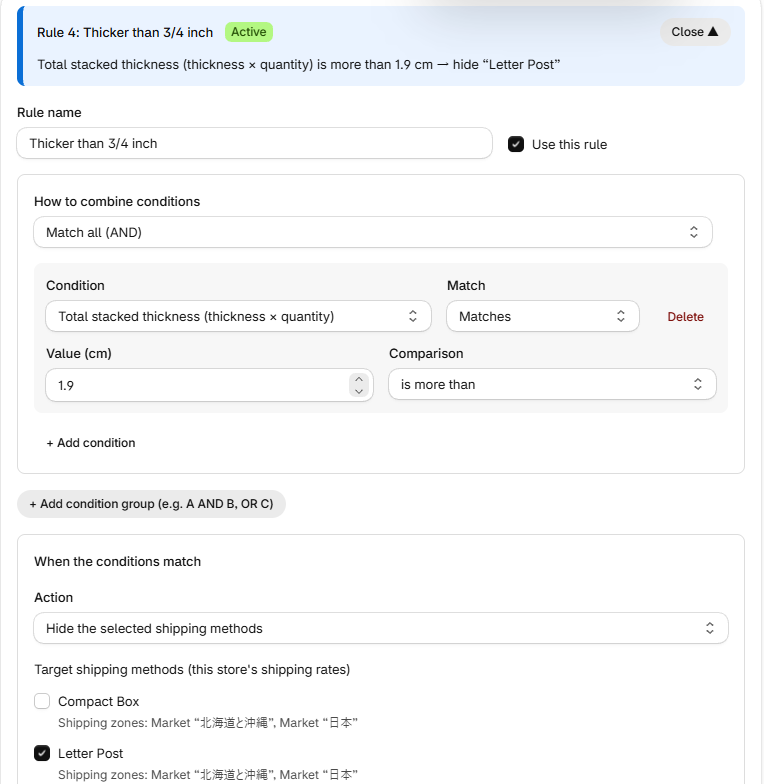
On the Delivery rules page, click Add rule, choose a condition such as total stacked thickness over 3/4 inch and the shipping methods to hide, then click Save. Conditions include size, weight, tags, collections, destination and order total, and you can combine them with AND or OR. The banner above each rule sums it up in plain words.
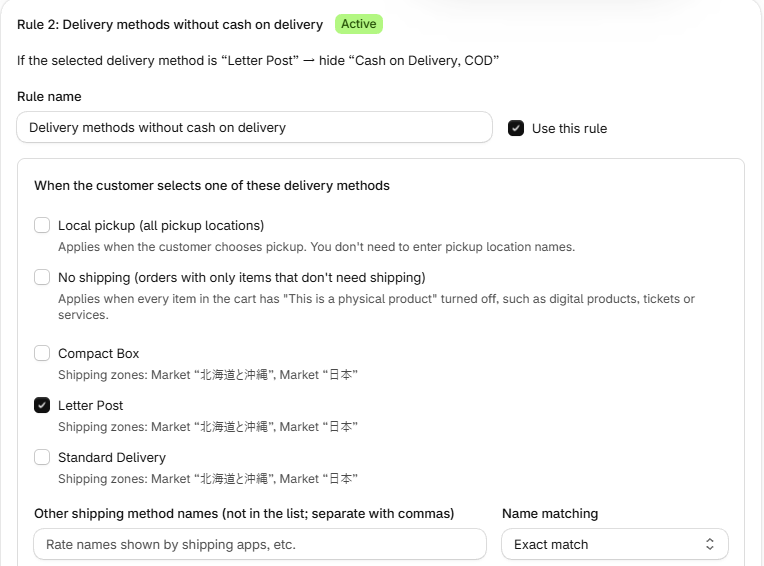
On the Payment rules page, click Add rule, then choose the shipping method the customer selects (for example, letter-box delivery) and the payment method to hide (for example, cash on delivery). Enter payment methods as they're named in Settings → Payments.
In the rule tester, pick products, a destination and a shipping method to see which shipping and payment methods your saved rules show. Then confirm at your real checkout.
Screens are from a test store. Common conditions can also be added from Templates on the right side of the screen. For more details, see the help guide. Help & troubleshooting →
| Products | Collections, tags, cart quantity, order total |
|---|---|
| Size and weight | Total stacked thickness, per-item thickness, longest side and sum of sides, cart weight, per-item weight, products without sizes |
| Destination | Country, state or province, postal code (starts with), address keywords |
| Customer | Customer tags (logged-in customers) |
| Discounts | Specific discount codes or automatic discounts, any discount applied, shipping discount applied, discount amount |
| Combining | AND, OR and NOT |
| Payment rules | Selected shipping method, pickup or no shipping, product tags, collections, order total (min/max), total weight (min/max), destination country, discounts, customer tags |
Stores on a Shopify plan that supports delivery and payment customizations, in any country.
No. Parcelwise shows or hides shipping and payment methods. It doesn't change rate amounts.
No. You can use tags or collections without entering sizes. To use size conditions, enter package dimensions on the product page.
Yes. For methods not in the list, type the name exactly as it appears at checkout.
No. At checkout, customers choose a shipping method before a payment method. Instead, Parcelwise hides payment methods based on the selected shipping method.
There are three plans: shipping rules, payment rules, or both. Each starts with a 7-day free trial. Pricing is shown on the Shopify App Store listing, and charges appear on your Shopify bill.
Filtering stops and all shipping and payment methods are shown as usual.
Questions or requests? Email us. We respond in English or Japanese.